Norma by Quality Clouds has a new Analytics view, and it answers a question that has been almost impossible to answer until now: how much of your committed code was actually checked while it was being written, rather than after it landed.
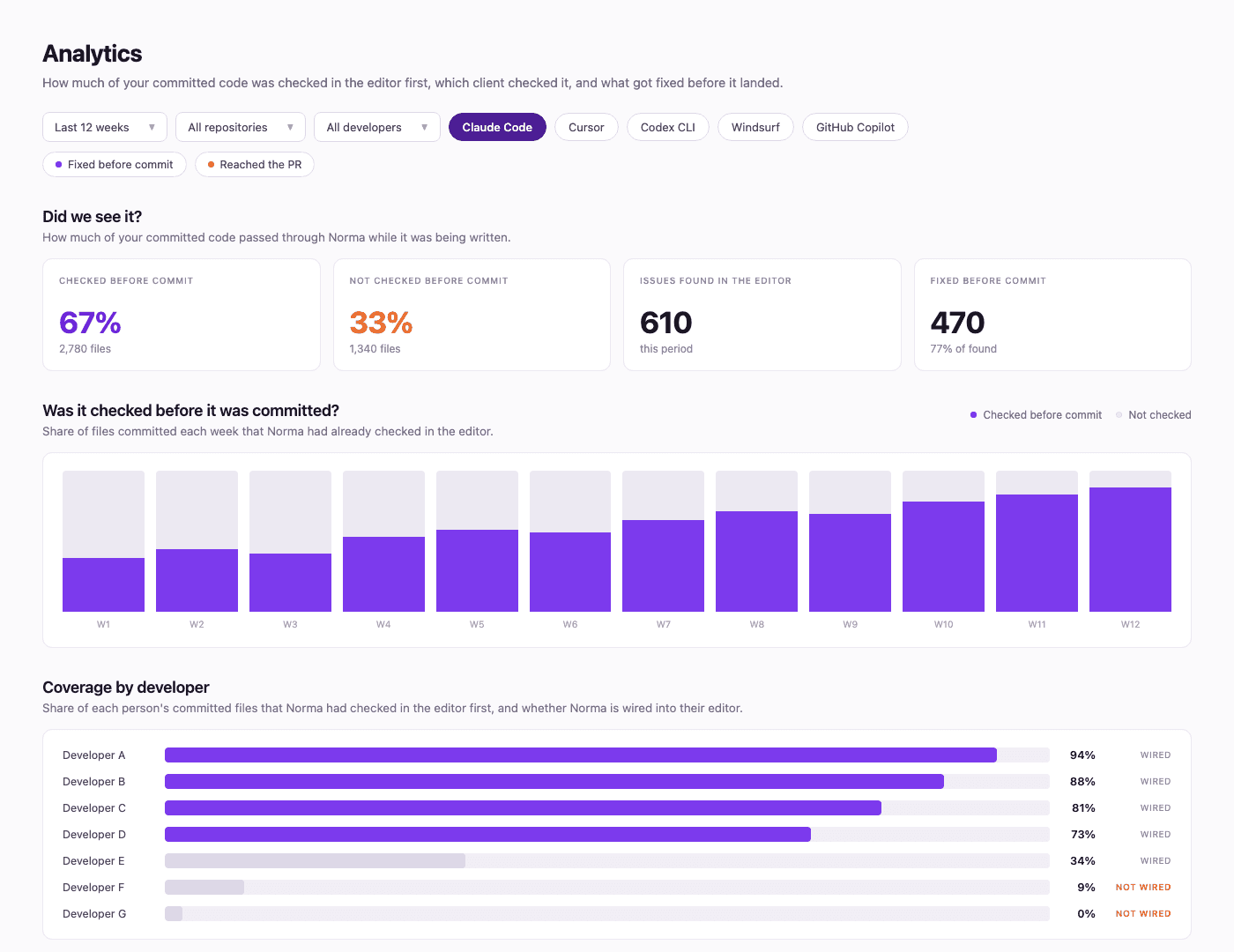
The Analytics view. Figures shown are illustrative.
The four figures
The top of the view, under "Did we see it?", is four numbers over the period you select.
Checked before commit. Committed files that Livecheck had already checked in the editor.
Not checked before commit. Committed files that landed with no editor check at all.
Issues found in the editor. Findings raised on the checked files while they were still being written.
Fixed before commit. Of those findings, the ones resolved before the commit.
Together they describe how much of your code the governance layer saw at the point of writing, and what came of it.
What else it shows
Was it checked before it was committed? The share of files committed each week that Norma had already checked in the editor, as a trend line. The same measure is cut by repository, because coverage is rarely uniform across them.
How each caller behaves. How each AI coding tool handles a finding once it has it. Same rulesets, same repositories, only the client calling Norma changes. Claude Code, Cursor, Codex CLI, Windsurf, and GitHub Copilot each respond differently.
Coverage by developer. Two separate things, shown side by side:
Whether Norma is wired into that person's editor at all.
Whether they are using it on the code they actually commit.
The first is a setup task that takes ten minutes. The second is a workflow question. Both are worth knowing, and they need different fixes. This is a deployment report, built to find editors where the check is not running.
Where the issues went. Every issue Norma found in the editor over the period, by outcome: fixed before commit, or reached the pull request. Plus a list of recent Livecheck runs, what was found in each, and what happened to each finding.
Everything filters by repository, by developer, by client, and by outcome.
Why we built it
Teams connect Norma, the findings start arriving, and the next question is always the same one: is this everything?
A findings count has no denominator. It goes up when the team is busy and down when people are on vacation.
Coverage does. It includes the developer who never installed the tool, the contractor who commits through a different workflow, and the repository nobody remembered to connect.
Where to find it
Analytics is in the Norma web app at norma.qualityclouds.com. It fills in as Livecheck runs, so connect a repository and give it a couple of weeks.
We wrote up the method behind the metric in more depth, including how to calculate it, the four states every committed file falls into, and a checklist for raising coverage: How much of your AI-generated code is actually governed before commit?
Then start with the "not checked before commit" figure. That single number usually shows you the biggest gap.
Frequently asked questions
What does "checked before commit" mean?
Livecheck ran on the file in the editor before the developer committed it, called by whichever client they were working in. Analytics recognizes Claude Code, Cursor, Codex CLI, Windsurf, and GitHub Copilot. The check happened while the code was being written, not after it landed in the repository.
Why is coverage more useful than a findings count?
A findings count has no denominator. It rises when the team is active and falls when people are on vacation, so it never tells you what share of your code was governed. Coverage uses the commit history as the denominator, so it includes every file that was committed, including work from developers who never installed Norma and repositories that were never connected.
What are the four figures Analytics reports?
The first two split every committed file: checked before commit, or not checked before commit. The second two describe what happened on the files that were checked: issues found in the editor, and fixed before commit. Together they show how much of your code the governance layer saw at the point of writing, and what came of it.
Does Analytics show which AI tools are being used?
Yes. The "How each caller behaves" view breaks results down by client, across Claude Code, Cursor, Codex CLI, Windsurf, and GitHub Copilot. Same rulesets and same repositories, so what you are comparing is how each tool handles a finding once Norma returns it.
Can I see coverage by individual developer?
Yes. The Coverage by developer view shows two separate things: whether Norma is wired into that developer's editor at all, and what share of the files they committed were checked before the commit. These are different problems with different fixes, which is why they are shown side by side. It is a deployment report, built to find editors where the check is not running.
What does "checked before commit" mean?
Livecheck ran on the file in the editor before the developer committed it, called by whichever client they were working in. Analytics recognizes Claude Code, Cursor, Codex CLI, Windsurf, and GitHub Copilot. The check happened while the code was being written, not after it landed in the repository.
Why is coverage more useful than a findings count?
A findings count has no denominator. It rises when the team is active and falls when people are on vacation, so it never tells you what share of your code was governed. Coverage uses the commit history as the denominator, so it includes every file that was committed, including work from developers who never installed Norma and repositories that were never connected.
What are the four figures Analytics reports?
The first two split every committed file: checked before commit, or not checked before commit. The second two describe what happened on the files that were checked: issues found in the editor, and fixed before commit. Together they show how much of your code the governance layer saw at the point of writing, and what came of it.
Does Analytics show which AI tools are being used?
Yes. The "How each caller behaves" view breaks results down by client, across Claude Code, Cursor, Codex CLI, Windsurf, and GitHub Copilot. Same rulesets and same repositories, so what you are comparing is how each tool handles a finding once Norma returns it.
Can I see coverage by individual developer?
Yes. The Coverage by developer view shows two separate things: whether Norma is wired into that developer's editor at all, and what share of the files they committed were checked before the commit. These are different problems with different fixes, which is why they are shown side by side. It is a deployment report, built to find editors where the check is not running.
What does "checked before commit" mean?
Livecheck ran on the file in the editor before the developer committed it, called by whichever client they were working in. Analytics recognizes Claude Code, Cursor, Codex CLI, Windsurf, and GitHub Copilot. The check happened while the code was being written, not after it landed in the repository.
Why is coverage more useful than a findings count?
A findings count has no denominator. It rises when the team is active and falls when people are on vacation, so it never tells you what share of your code was governed. Coverage uses the commit history as the denominator, so it includes every file that was committed, including work from developers who never installed Norma and repositories that were never connected.
What are the four figures Analytics reports?
The first two split every committed file: checked before commit, or not checked before commit. The second two describe what happened on the files that were checked: issues found in the editor, and fixed before commit. Together they show how much of your code the governance layer saw at the point of writing, and what came of it.
Does Analytics show which AI tools are being used?
Yes. The "How each caller behaves" view breaks results down by client, across Claude Code, Cursor, Codex CLI, Windsurf, and GitHub Copilot. Same rulesets and same repositories, so what you are comparing is how each tool handles a finding once Norma returns it.
Can I see coverage by individual developer?
Yes. The Coverage by developer view shows two separate things: whether Norma is wired into that developer's editor at all, and what share of the files they committed were checked before the commit. These are different problems with different fixes, which is why they are shown side by side. It is a deployment report, built to find editors where the check is not running.