
Seven ways a ServiceNow developer can build with AI today, three places the result can land, and how to check each of them.


AI is already writing ServiceNow code on your instance. What you don't know yet is which door it came through. There are at least seven, and they are not equally safe.
The simplest one needs no process at all. A developer asks a chat assistant for some ServiceNow functionality and pastes the script into a business rule, script include or client script. Even if you have never approved AI-generated code, or have explicitly forbidden it, nothing on the platform can stop that.
The other routes are more formal. ServiceNow now ships three AI-assisted ways to build inside the platform, two more exist for developers who prefer a local IDE, and general-purpose browser agents have quietly added another.
The short version
There are seven ways to build on ServiceNow with AI today, from copy-paste out of ChatGPT to Build Agent writing Fluent in Git.
They land in three places: a record on the instance, XML synced from VS Code, or Fluent source in a repository.
Your quality checks belong at those three landing places, because you can't control which tool a developer picks.
Quality Clouds for ServiceNow covers records and synced XML in full today. For Fluent, it covers what gets deployed to the instance; scanning the Fluent source itself is in progress.
The fastest first step: turn on Livecheck on save. It governs every route that ends as a record, the same day.
A note on scope: this post is about building configuration and code, not about the AI features ServiceNow sells to end users. ServiceNow Otto for ITSM is out of scope. ServiceNow Otto for Creator, until recently called Now Assist for Creator, is in.
The seven routes at a glance
# | Route | Lands as | Quality Clouds for ServiceNow coverage |
1 | Copy and paste from a chat assistant | A record | Full |
2 | Browser agent operating the UI | A record | Full |
3 | Otto for Creator | A record | Full |
4 | Build Agent in ServiceNow Studio | A record | Full |
5 | VS Code extension with any coding assistant | Synced XML | Full after the push, partial before it |
6 | Build Agent in the ServiceNow IDE | Fluent source | On the instance; source scanning in progress |
7 | ServiceNow SDK, writing Fluent locally | Fluent source | On the instance; source scanning in progress |
The rest of this post walks through each group, ordered within each from the least to the most supported, then looks at what it means for governance.
Routes 1 to 4: what lands as a record on the instance
Four routes end the same way: a developer, or something acting as one, saves a record through the platform. Two of them use no ServiceNow AI feature at all, which is exactly why they are the cheapest to start and the hardest to see. The other two are ServiceNow's own.
1. Copy and paste from a general-purpose assistant
The developer asks ChatGPT, Claude or Copilot for a business rule, copies the result and pastes it into the script field. Zero setup, zero governance, and the model has never seen the instance.
It writes plausible ServiceNow. Without context, and given an ambiguous enough prompt, it can also make true beginner mistakes: a GlideRecord in a client script, a synchronous GlideAjax call, a business rule on the Global table. Nothing stops any of it from being saved.
2. A browser agent operating the UI
Claude in Chrome, or any LLM with a browser extension, is pointed at the instance and told to create a scripted REST resource. It clicks through the forms as a developer would, with the developer's permissions.
This is new and it is spreading. It leaves the same audit trail as a human: a record with a sys_created_by, nothing more. The agent doesn't know your standards unless someone wrote them into its prompt.
3. Otto for Creator
ServiceNow's own generative skills inside the platform: code generation in script fields, flow generation in Workflow Studio, catalog item creation, playbook generation. Supported, licensed and scoped to the instance it runs in.
It is still single-component. It helps write one thing well rather than build an application end to end.
4. Build Agent in ServiceNow Studio
A conversational developer agent that plans, builds and deploys metadata across the application: tables, ACLs, business rules, flows, UI. It arrived in the IDE with Zurich and reached Studio in 2026. It now covers more than sixty metadata types and works in global scope as well as scoped apps.
That puts it in a different category from a script-field helper. It produces whole features.
What routes 1 to 4 have in common
The artifact: a record with a sys_updated_by and no other provenance. The AI's context varies from none at all to a full read of the application, but context is not governance. An agent that knows your tables still doesn't know the rule your architects added after last year's incident.
Route 5: what lands as XML synced from outside
One route ends with XML metadata pushed back to the instance from a developer's machine.
5. The ServiceNow extension for VS Code, with any coding assistant
The developer syncs an application from the instance into VS Code, writes or generates scripts with Copilot, Cursor, Claude Code or whatever they already use, and the extension pushes the result back as the XML-based metadata the instance understands.
The instance stays the system of record. The extension works off what it synced from there, not off a Git checkout. Putting the XML under version control is possible, but optional and separate.
What changes is what the AI assistant can see: the surrounding files, the naming conventions and whatever rules file the team keeps in the workspace. Teams with an existing engineering culture usually land here first, because it changes the least. (We compared the editor options in more detail in our guide to ServiceNow IDEs.)
Routes 6 and 7: what lands as Fluent source in a repository
Two routes produce TypeScript rather than records. The instance still ends up with metadata, but it is built from source, and the source is what gets versioned and reviewed.
6. Build Agent in the ServiceNow IDE, writing Fluent
The same agent as in Studio, but the output is TypeScript using the ServiceNow Fluent SDK rather than form-based metadata. The app lives as code in the browser-hosted IDE and can be pushed to Git from there.
Nothing is installed; the IDE is a tab on the instance. This is the first route where the artifact is a source file rather than a record.
7. The ServiceNow SDK, writing Fluent locally
The same Fluent SDK, with the toolchain on the developer's machine: scaffold, build, deploy and fetch from the CLI, Git as the source of truth, CI in the pipeline, and any coding agent the team already uses alongside it.
The application is a TypeScript codebase that happens to deploy to ServiceNow.
Seven routes, three landing places
A record, synced XML, Fluent source. The seven routes sort into them cleanly, and the sorting matters more than the count, because each landing place gives a check a different moment to run.
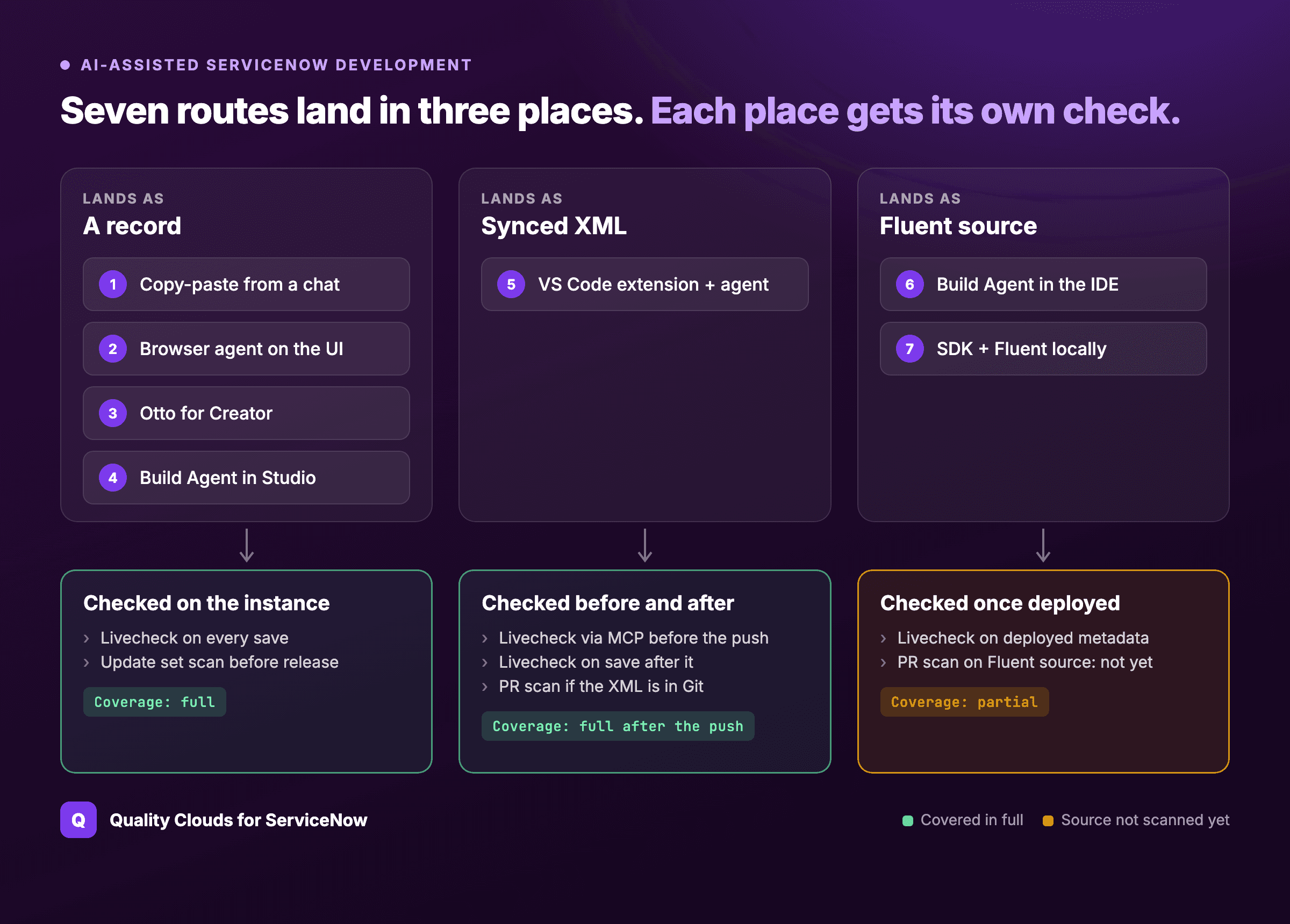
Every route ends in one of the three lanes. The check sits at the lane's exit, whichever tool wrote the code.
Where ServiceNow is taking this
The direction is clear: Fluent, in Git, with any coding agent. Every ServiceNow release since Zurich has moved weight from the first landing place toward the third. Build Agent writes Fluent. The IDE pushes to Git. The SDK is documented alongside third-party agents rather than against them.
Records are not going away. The bulk of every existing instance was built as records and will be maintained that way for years. They are just no longer where the investment goes.
For a development lead, that means all three landing places will be live on your instance at once, for years. The most durable place to enforce a standard is the landing place itself. A record is saved. XML is pushed. Source is committed and merged. Put the check at each of those three moments and it stops mattering which assistant wrote the code, or whether anyone remembered to ask it to check its work.
Where Quality Clouds for ServiceNow fits, landing place by landing place
Quality Clouds for ServiceNow checks the artifact, whoever or whatever wrote it, so its coverage follows the three landing places rather than the seven routes. Livecheck runs against the full XML definition of a configuration element and returns findings against your rule set, with the remediation each rule expects.
Where coverage is complete we say so. Where it is still catching up, we'd rather say so here than let you find out in a demo.
Records on the instance: covered in full
With Livecheck configured to run on save, every configuration element is checked at the moment it is saved, whatever wrote it. A pasted script, a browser agent clicking through a form, an Otto suggestion and a Build Agent deployment all become saved records, and every save is checked against the same rules.
The developer sees the findings in context, fixes them and saves again. Nobody sets anything up per tool, and a contractor's chat window is held to the same standard as the platform team.
Update set scanning then covers the release. Everything that moves between instances, by any route, is scanned as a unit before it moves. This is the check that catches what slipped past the editor.
XML synced from outside: covered in full after the push, partly before it
Once the VS Code extension pushes to the instance, Livecheck on save and update set scanning apply exactly as above.
The window before the push is where the Quality Clouds MCP for ServiceNow comes in. Connect it to Claude Code, Cursor, Copilot or Windsurf, and the assistant can run Livecheck on the component it has just generated, apply the fixes and check again before anything is synced.
One caveat: Livecheck needs the complete XML element, and an assistant editing a bare script file may only have the script. The MCP server is strongest when the component already exists as XML and weaker when it is a fragment.
If the XML is also kept in a repository, pull request scanning adds a third inspection point. When a feature branch opens a PR, the changed elements are scanned and the findings land on the PR, so Git-based teams get the same gate inside their own workflow. (More on that in how to govern ServiceNow pull requests in GitHub.)
Fluent source in a repository: covered on the instance, not yet in the repository
The metadata Fluent deploys to the instance is checked like any other record, so nothing a Fluent app does on the platform goes unchecked.
The source itself is the gap. Pull request scanning works on XML-based repositories today and does not read Fluent yet. That is the piece we are building, and we want to build it with the teams already writing Fluent, because that is where ServiceNow is heading.
Across all three: ask the instance from the editor
The Quality Clouds MCP for ServiceNow also lets the assistant read the instance: latest scan coverage, high-severity findings by application and owning team, dev compared with production, who is building what.
A developer who wants to know whether this week's work created debt can ask in the editor and get an answer in seconds. That is the condition under which they will actually ask.
The practical reading
Turn on Livecheck on save and the first landing place is governed in an afternoon, along with the instance side of the other two. Add update set scanning and you have a release gate. Add PR scanning and your Git-based XML teams get that gate in their own workflow.
The MCP server is the optional extra for teams who want the check before the push. It is also the one place where coverage is constrained.
What to do this month
Find out which routes are in use. Ask a few developers how they wrote their last business rule. If the answers differ, or one of them involves a tool nobody formally approved, you have a mix of routes and no single place where a standard applies to all of them.
Configure Livecheck to run on save. It needs no change to how anyone works, and it brings everything that lands as a record under one standard the same day.
Cover the VS Code and SDK teams. Add update set scanning and connect PR scanning to the repositories that hold XML metadata. If those teams use a coding agent, point it at the Quality Clouds MCP for ServiceNow at
mcp.qualityclouds.com/mcp, so it can check components before they sync and ask the instance about its own findings.If you are moving to Fluent, tell us. What Fluent deploys is already covered on the instance. Scanning the source itself is the piece we are building, and the teams already writing Fluent are the ones we want to build it with.
Setup and coverage details are in the Quality Clouds documentation. Workflow skills for the coding agents are published on github.com/qualityclouds, free to adapt to your own standard.
Common questions about AI-assisted ServiceNow development
What are the ways to build on ServiceNow with AI?
There are seven today: copy and paste from a chat assistant, a browser agent operating the UI, Otto for Creator, Build Agent in ServiceNow Studio, the ServiceNow extension for VS Code with any coding assistant, Build Agent in the ServiceNow IDE writing Fluent, and the ServiceNow SDK writing Fluent locally.
How do I govern AI-generated code on ServiceNow?
Put the check where the code lands rather than on any one AI tool. Every route ends as a saved record, XML synced to the instance, or Fluent source in a repository. Quality Clouds for ServiceNow checks records with Livecheck on save, checks releases with update set scanning, and checks XML repositories with pull request scanning.
What is ServiceNow Fluent?
Fluent is ServiceNow's TypeScript-based way of defining applications as source code, through the ServiceNow Fluent SDK. Build Agent in the ServiceNow IDE writes Fluent, and the ServiceNow SDK lets developers write it locally with Git as the source of truth.
Does Quality Clouds for ServiceNow scan Fluent source code?
It checks the metadata a Fluent app deploys to the instance, like any other record. Pull request scanning works on XML-based repositories today and does not read Fluent source yet; that is in development.
Can a coding agent check its own ServiceNow code before it syncs?
Yes. Connect the Quality Clouds MCP for ServiceNow to Claude Code, Cursor, Copilot or Windsurf, and the assistant can run Livecheck on a component it has generated, apply the fixes and check again before the VS Code extension pushes it. It works best when the component exists as complete XML.

Ignacio Sales
Co-Founder & CTO, Quality Clouds
Related articles
Stay ahead of the curve

ServiceNow and GitHub: how to govern pull requests when your apps move to source control

Taher Dohadwala
6 min read
ServiceNow source control works per application and the diff is XML. Here's what that means for pull requests, update sets, and where to put the gate.

Norma Analytics: how much of your code was checked before commit

Albert Franquesa
4 min read
How much of your committed code was checked in the editor first, which client checked it, and what got fixed before it landed.
Context engineering needs a verification step
Albert Franquesa
5 min read
Better context raises the odds that AI-generated code is good. It does not tell you whether any particular file is. Here is where the check goes.