
Unapproved integrations are the "Wild West" of ServiceNow, introducing hidden security risks and technical debt. In this post, we’ll show you how to implement a simple, automated governance gate using Quality Clouds to flag new connections for review while letting your daily maintenance flow through without friction.



TL;DR
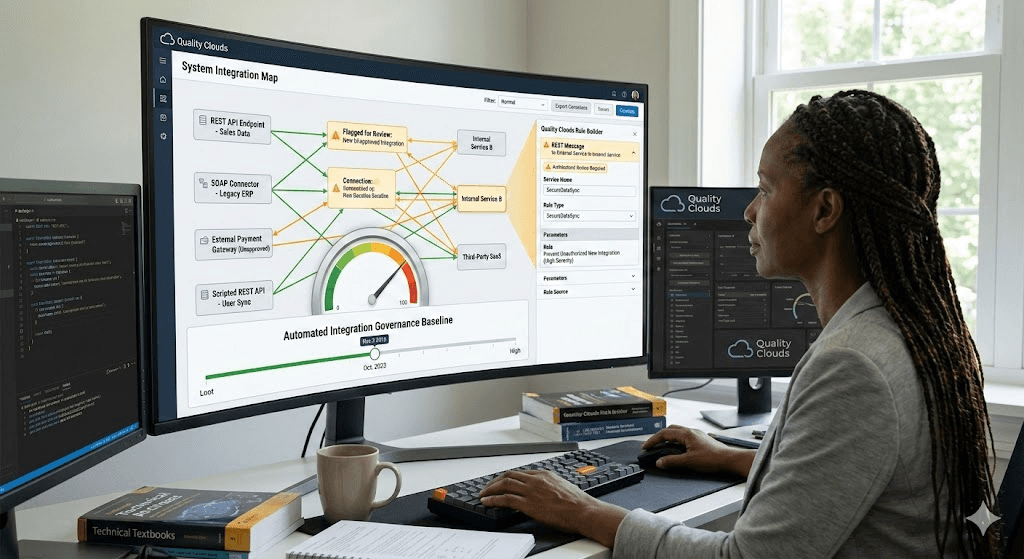
To prevent "integration sprawl," ServiceNow platform owners can use the Quality Clouds Rule Builder to implement an automated governance gate. By monitoring specific integration tables (REST, SOAP, and Scripted REST APIs) and filtering for records created after a specific "governance baseline date," teams can automatically flag new, unapproved connections while allowing existing maintenance to proceed without friction.
The Challenge: Integration Sprawl and Security Debt
In the rush to deliver features, ServiceNow developers often create new outbound (REST/SOAP) or inbound (Scripted REST API) connections without formal architectural review or security approval. This phenomenon, known as "integration sprawl," introduces significant risks:
Security Exposure: Unapproved integrations can bypass data access controls or expose internal logic.
Compliance Risk: New connections may violate regulatory frameworks by exposing sensitive data to unauthorized external consumers.
Architectural Drift: Undocumented integrations accumulate as technical debt, making the instance harder to maintain and upgrade.
The industry is demanding better. As highlighted in JPMorgan Chase’s Open Letter to Suppliers, leading institutions now require rigorous vulnerability management and "security by design" from their partners.
For ServiceNow teams, this means moving away from manual, error-prone Update Set reviews toward a deterministic governance layer.
The Solution: An Automated Governance Gate
Using the Quality Clouds Rule Builder, you can monitor metadata within Update Sets to identify new integration components automatically. The strategy involves targeting three primary integration types:
Table 1: Integration Categories and Risks
Implementing the "Gate" Logic
The power of this approach lies in its simplicity. Instead of blocking all integration work, the Rule Builder uses a date-based filter to distinguish between maintenance and new architectural introductions.
The Core Logic: Raise an issue if a configuration element is created after a designated governance baseline date.
Table 2: Rule Configuration Detail
Why This Works for Architects and Security Teams
Low Friction for Developers: By filtering on the creation date, existing integrations (created before the baseline) can be updated or maintained without triggering false positives.
Automated Enforcement: Quality Clouds automatically flags "Red Flag" components, reducing the manual review burden on architecture and security teams.
Standardized Controls: Every new external connection is forced to follow company standards, such as proper OAuth usage and endpoint registration, before it ever reaches production.
Central Visibility: A unified dashboard provides leadership with real-time insight into how many new integrations are being attempted across various dev teams.
Getting Started: Next Steps
Access the Rule Builder: Open the Quality Clouds portal or launch it from within the app
Define the Custom Rules: Create three rules (REST, SOAP, Scripted REST API) and assign them to your target instances.
Run a Baseline Scan: Execute a scan on your "In Progress" Update Sets to identify any pending integrations and establish your baseline date.
Review and Iterate: Work with your architecture team to refine thresholds and approve or reject flagged items.
Don’t have a Quality Clouds license?
You can start automating your platform governance today for free. Quality Clouds offers a Free version for Developers that includes:
Automated code quality scanning to maintain high standards.
Real-time AI code validation with LivecheckAI via MCP.
Profiling scans and Best practice rule checks.
Basic reporting dashboard for essential visibility.
AI-powered features (capped usage included).

Albert Franquesa
Co-Founder & CSO, Quality Clouds
Related articles
Stay ahead of the curve

Claudeforce makes Salesforce headless. Governance has to move with it

Taher Dohadwala
6 min read
Salesforce is going headless. Learn what changes and how to govern what the agents build

Your Vibe Coded App Probably Has a Security Hole. Here Is How to Find It.
Albert Franquesa
10 min read
The five security holes AI keeps writing into vibe coded apps, and how to find yours in about two hours.

Agentforce Vibes Governance: What Salesforce's New AI Coding Guardrails Mean for Your Org
Taher Dohadwala
7 min read
Salesforce is putting coding agent guardrails in DevOps Center. What the 6 policies cover, what they miss, and what to do about it.